Showing posts with label SEO. Show all posts

Monday, June 3, 2013

First the Panda, Now the Penguin - What's Up With Google?

Panda Penguin 2.0On May 22, 2013, Matt Cutts announced on his blog that they are rolling out Penguin 2.0 . It has actually been the fourth release since the first Penguin. However, Google have been referring to it as Penguin 2.0 since not just minor refreshes on the existing algorithm were made.  They had made some changes on the algorithm itself.  This means, the updates would most likely have a stronger impact in the search results. 

So, what's up with Google this time? What can webmasters expect in the coming months from Google SEO?   On this video, Matt Cutts not only answers this question. He reassures webmasters- who prioritize the benefits of their users, that they should not be affected negatively in any way. On the contrary, the Penguin should bring more good their way because the new algorithms were created to help people find the best sites out there. How?  Here are some of the points given:

Discover black hat webspam. One of the main purposes of Penguin 2.0 is to discover webspam, What is webspam? It is a "black hat", meaning illegal SEO tactic which deceives search engine spiders. Webspam can be done in different ways such as by swamping an entire page with a lot of keywords or key phrases. 

Another strategy is by deliberately inserting keywords in the content, not withstanding the fact that the article is filled with grammatical errors and that some statements do not make any sense at all. Indeed, armed with a Spinning Software, many webmasters can recreate multiple versions of a single article within minutes, simply by altering words and phrases with possible replacements. The result is a poorly "spun" version of the article, stuffed with meaningless phrases which, would often sound ridiculous to a sane human reader. Obviously, the content was not created for people but intended to make-a-fool out of search engine spiders. 

Apparently, the Penguin can tell. In addition, Google encourages more interaction with webmasters. For instance, if you happen to come across a spam site, you can report it at http://bit.ly/penguinspamreport and Google will check on it. 

Distinguish advertorials that violate guidelines. Some advertisers pay to have their links included in a post or to get a positive review. Matt said there's nothing wrong with paid posts and that advertorials should not lower a website's page rank as long as it meets the guidelines accordingly. For example, there should be a clear disclosure stating that it was a paid review so that the reader can be made aware of that fact. 

Detect hacked sites and sites with malware. Searchers are now alerted about websites that have been possibly hacked or may serve malware. Again, Matt emphasized that they are not after penalizing the webmasters of the hacked sites. They are simply protecting internet users from opening potentially hazardous websites or pages. In fact, Google has provided assistance for webmasters who have been hacked (http://www.google.com/webmasters/hacked/) so they can immediately fix the problem.


Matt did not give exact details about the changes or the algorithms. He made it clear though that for those who are working hard to enhance the quality of their websites by implementing "white hat" or legitimate SEO techniques, there is nothing to worry about. In effect, these updates would benefit even webmasters who do not perform SEO tactics at all, but who are focusing on providing great, quality content for their audience.

Monday, March 18, 2013

Google Bids Goodbye to Google Reader


Last week, Google has made the official announcement on its blog that it would be shutting down Google Reader along with other services it has provided in the past years. Google Reader is set to retire on July 1, 2013.  According to Google, despite a solid following, the number of users has declined over time.  Another reason cited is that the move was essential so that it can focus on enhancing its primary products and services.

What is Google Reader?  


If this is the first time you've been hearing about Google Reader because of all the news of its imminent closing, you might be wondering what the fuss is about.  It is basically a feed subscription or an RSS (Rich Site Summary) reader.  Basically, it enables you to keep track of the latest content from your favorite websites and read them all from a single page.  

Many people has been utilizing this tool for years since it was introduced in 2005.  Obviously, not many are happy to hear about the news of its retirement.  If you have been using Google Reader, you can download an archive of your subscriptions through Google Takeout

Alternatives to Google Reader

Here are three alternative readers you can use for free :

Feedly Reader


Feedly  You can download Feedly on your desktop, mobile phone or tablet.  Use it to organize, read and share content from your favorite websites.  You can also migrate subscriptions from your existing Google Reader account to Feedly.

The Old Reader


The Old Reader   It works pretty much like the Google Reader. As of this moment, it does not have a mobile app just yet so you can only view it from a desktop.  It's free for up to one hundred feeds and costs $3 per month for the Premium account. Can you directly import subscriptions from your Google Reader account?  Yes, you can.


Bloglovin  As the name suggests, if you love blogs, then you'd love Bloglovin too! It allows you  to find and follow blogs across the web all in one page- simple as that.   But wait, there's more!

You can organize your favorite blogs according to categories - an indispensable option if you'd ask me, especially if you're subscribed to a hundred blogs or more.  You can download it on your desktop, iPhone, iPad and Android. 

If you're a blogger, it's also the perfect place to gain more followers.  Finally, you can import blog subscriptions from your Google Reader account in one click of a button.

Friday, February 1, 2013

What is SEO and Why Should You Learn It

SEO.  The three letters stand for Search Engine Optimization.  Based on this acronym, it's easy to guess that it has something to do with search engines and optimizing or enhancing website performance. 

To understand the concept of search engine optimization, imagine the World Wide Web as one huge spider web.  The spider must crawl along the thread to make its way around the web. In the same way, the World Wide Web is made up of billions of websites which are all inter-connected by a threadlike network.  Search engine spiders can crawl along these threadlike network to discover web pages. 

What are search engines?
Search engines help us find the exact information we need from the World Wide Web. How? We simply need to type a word or a phrase related to the information we are looking for, and let the search engine spider crawl along the threads and bring back a list of web pages with content relevant to our search.  

But, you may ask, "with a multitude of pages to discover in such a vast network, how does a search engine know which pages to include in the search result?"  Good question.  Search engines do not just discover web pages and bring back results based on keywords alone.  It also distinguishes good, quality websites from the poor ones.  Needless to say, it prioritizes good websites and these will float on top of search result listings. 

Why SEO is Essential
Now, here is where Search Engine Optimization becomes a matter of importance.  There are different factors which can affect a website's search engine ranking.   Each search engine has a set of metrics or algorithms that it uses to gauge the relevance, popularity and quality of a website.  Optimizing search engine means taking the necessary steps to make sure that your website meets the search engines' criteria of a good, quality website.

Now, try to search for a specific keyword in Google, for example, and notice that you will get not just one or two-pages of results but more likely, a couple of pages, even a hundred of pages containing a list of websites that contains the keyword you searched for.  Which websites are included on the first page or the first few pages?  These are supposedly the websites that offer the most significant and relevant information on the keyword being searched.  In addition, the websites on the first page also bear the highest rankings which is why it is given the top priority on the list.

Of course, if you were searching for information, wouldn't you most likely check out the websites found on the first page of the results list?   You may also check out the results found on the second, third or the next few pages but only if you do not find what you need right away.  Consequently, websites that are on the bottom pages has a slim chance of getting discovered.  Thus, you can begin to understand why websites are competing achieve a high rank and be on top of the search engine's listing.

Indeed, SEO is such a crucial endeavor for many webmasters.  Should you learn it?  Understanding the concept of SEO and implementing basic SEO steps can tremendously enhance your website's search engine rank and make it more accessible to people. So long as you stick with "white hat" SEO techniques,  optimizing your website for search engines would bring many advantages.


References:

Monday, January 7, 2013

Make Your Blog Search Engine Friendly In Ten Easy Steps

Here are ten practical and easy-to-follow steps to make your blog more search engine friendly.

1. Make your content worthwhile. Quality content is still an essential foundation to stay on top of the competition.  If you work hard to present useful, original, informative, compelling, entertaining, worthwhile content on your website, it will surely attract a great number of readers and build a solid following of audience. People would bookmark your site, subscribe to your feeds, or sign up for email subscriptions.  People are driven to your website simply because they find something that’s genuinely worth their time in there – and this is called “organic traffic”.

2. Post new content daily. Search engine spiders are easily attracted by updates.  In other words, putting out fresh, unique content every day would make your site a search engine magnet.  If you can't publish a post on a daily basis, do it at least three times a week or as frequently as possible.  This is the reason why blogs have become strong traffic competitors ~ most bloggers post entries everyday.

3. Do not copy content.  :Publishing duplicate content has always been a violation and will definitely damage your website's reputation.  A lot of webmasters today use Copyscape - a software that can detect duplicate content and plagiarism.

What about posting excerpts or a portion of an article taken from another website?  This should be done very sparingly and with good intent.  Scraping content or making slight modifications on the text to make it seem "unique" just for the sake adding content to your website will not contribute real value to your website's ranking and credibility.  Instead, work hard on creating well-researched, professionally written, original posts.

4. Use categories smartly.  Using categories helps readers find posts on specific topics more easily.  But that's not at all.  It also helps search engines to classify pages of your website according to groups or keywords, making it easier to find relevant search results from your website.

To make the most of this tool, limit the number of categories on your website and choose the best category for each post.  This way, you can be sure that all posts related to a particular topic falls only under one category.  Furthermore, you can avoid having duplicate content or pages with the same content belonging to different categories.

5. Use sharing buttons.  One way to promote wider readership is to provide sharing buttons on each page, making it easier for your readers to share a post from your blog or website on Social Networks.  A lot of people today are on these social sites (Twitter, Facebook, LinkedIn, Pinterest Google+, Instagram) and if a guest enjoyed your post, this person surely wouldn't mind clicking on one of the sharing buttons for friends, relatives and other people to see it.  Thus, including a simple statement asking a reader to "share the post if they liked it" may go a long way. 

Does Google measure social media popularity in ranking a website?  The world is still waiting for a clear confirmation from Google on this matter but considering the fact that Google Analytics has included social media stats on its report only strengthens the assumption that social media popularity signals (especially, Google+), has bearing on search engine ranking. One thing is certain though - applying this advice is a proven way to increase exposure and drive traffic to your site.

6. Use the "ALT" tag. The ALT tag?  It is an html code used for images where you can insert a text description of the photo on the post. Usually, blogging platforms like Blogger and Wordpress has an easy-to-use tool that allows you to do this to edit the properties of the photo.

Why is it important to include an ALT description?  The answer is because search engine crawlers cannot read images. Therefore, Including a text description in the ALT tag helps search engines to recognize images on your posts, so they can also be visible in search results.

7. Use relevant keywords or phrases.  Which words or phrases would people type in the search box if they want to find information relevant to your content?  These are called keywords or key phrases and it is very important to include them in your posts.  Use keywords in titles and headings as well.  Be careful not to overdo it though.  Keyword stuffing or filling a page with too many keywords is considered as a violation and would make your website look bad in the eyes of search engine spiders.  If you keep Step #1 in mind, which is to write quality posts, this should not be a problem at all.

8.  Include relevant inside links in your content.  This is a good strategy to point your readers to other pages of your website. For instance, you may recommend one or two posts on the same topic which you think would be helpful or provide additional information.  Test if the link is working and that the URL directs to the right page.  Instead of using vague words like "here" or "this", try to use more descriptive words so that it is clear what the page is about.  (To see examples, pay attention to the links in Step #9).

9.  Submit a Sitemap  A sitemap is basically a list of all pages in your website and it helps search engines find its way more easily, so to speak, through your website.  Having a sitemap would ensure that Google and other search engines can crawl and index all the pages of your website.  This is especially recommended if your website has dynamic pages or if it contains a lot of videos, moving images, and photos.

Otherwise, your Sitemap can be a list of all the URLs or pages of your website, with only one URL per line.  You can submit your Sitemap using Google Webmaster Tools. For a more in-depth discussion on Sitemaps, here's an article from Google on How to Create A Sitemap.

10. Exchange links with high quality blogs.  Blogging involves active participation in blogging communities.  It's not just a one-way road.  Reading and following other blogs is an essential gesture to gain exposure and promote your own blog as well.  In the process, you are bound to meet other bloggers on the same niche.  Look for blogs with great content like yours and see if you can exchange links with the blog authors.


References:


Thursday, July 7, 2011

Three Useful Resources to Learn SEO from Scratch

When a workmate mentioned “SEO” to me, I Googled the term and found out that the acronym stands for Search Engine Optimization. I have not the least idea about what SEO means.
seo

Although I’m no SEO expert, I’ve come to learn that it is an important factor for a blogger, webmaster, or internet marketer’s success. If you’re new to blogging or internet marketing, learning SEO as early as now will give you an advantage in improving your traffic, page rank and overall online presence.

I came across so many websites on the internet that tackle this particular subject but not all of them would be worth your time. On this post, I’m sharing three useful resources I read (and still do) to gain a better insight about Search Engine Optimization. Hopefully, you will find these resources as helpful as I did.

SEOMOZ offers a comprehensive guide for beginners starting from How Search Engines Operate, How People Interact with Search Engines, Why Search Engine Marketing is Necessary; down to the Fundamentals of SEO and How to Measure and Keep Track of Your Success. I love the fact that the concepts were explained in a straightforward manner- minus complicated terminologies; alongside simple illustrations that make the ideas easier to grasp.

seo moz


Traffic Generation Cafe is a favorite source on my list. Anna Hoffman answers some of the biggest questions about SEO that’s been on my mind. She writes in an engaging style so you feel comfortable reading the whole post.
traffic generation cafe

The Google's SEO Starter Guide provides easy-to-follow optimization techniques especially for beginners. Basic steps like using target keywords in titles and headers, anchor texts, and tags; improving site navigation; creating fresh content; and using free Google Webmaster Tools are discussed in this PDF version.
google webmaster central blog


What did you think of this article? I’d love to hear your thoughts. If you enjoyed the read or if you find it useful, kindly please click any of the sharing icons below. You can Tweet, Stumble, Share it on Facebook or +1 it.
Thanks,
Rachel:)
photo source:
1. seo

Sunday, July 3, 2011

Four Websites That Pay You To Blog


white notebookIn a previous post, I wrote about the three reasons why I blog and mentioned that it's one way to earn extra money. 

Today, I'm going to share with you four websites that pay you to blog. I personally signed up with these sites and have been a member since I launched The Shopbug, in 2007.

How much you earn from paid blogging will depend on the quality of your blog. Most advertisers are looking for blogs that are constantly updated and with at least 60% of unpaid content.

If you blog or if you plan to start one, check out these sources:


Advertisers from SR offer generous payout per post which can range from as low as $5 to as much as $300 or more. Bloggers earn 50% of the payout. Payment is sent via PayPal within 14 days once the completed review has been submitted.  Higher prices are reserved for top blogs with a higher page rank. PR is based on the link's popularity on Yahoo Search and Alexa.

To be approved, your blog must be at least three months old and must be indexed in major search engines like Yahoo & Google. Once approved, you can start bidding at opportunities and wait for the advertiser's response. When an advertiser accepts your bid, you must complete the review and submit the URL of the post within seven days. Be sure to read the rules and policies before signing up to avoid rejection.

Sponsored Reviews

Blogsvertise
If your blog has been live for 60 days, you can sign up with Blogsvertise.  Unlike other paid-to-blog sites, you don't need to bid to receive tasks as they are distributed based on the blog's eligibility.  However, you can grab 1 task per day from your dashboard whenever there is an available opportunity.

Average payout is $10 per post.  Each blog entry must be at least 100 words with 2 to 3 links of the advertiser's request.  Payment is sent via PayPal 30 days after the completed post has been submitted and approved.  Unfortunately, Wordpress blogs are not accepted.

blogsvertise

Social Spark
Your blog must be at least 90 days old with 20 pre-existing posts to get approved.  Your blog must also have Google Analytics since Social Spark uses this tool to calculate the suggested price per post.  Wordpress.com does not allow users to install Google Analytics on their blogs but if you have a self-hosted Wordpress.org blog, you can join Social Spark.

Once approved, you can view paid blogging opportunities from the Marketplace.  Publishers participating in the SocialSpark Marketplace must include the SocialSpark provided disclosure badge within each sponsored post.  Payment is sent via PayPal.

social spark


Like Social SparkPay Per Post is also by IZEA.  Bloggers have the option to choose paid post opportunities with "dofollow" and "nofollow" tags.  If you use Twitter, you can also sign up for sponsored Tweets.

sponsored tweets

Any other paid blogging sites that you know?  Please share it by leaving a comment:)


What did you think of this article? I’d love to hear your thoughts. If you enjoyed the read or if you find it useful, kindly please click any of the sharing icons below. You can Tweet, Stumble, Share it on Facebook or +1 it.

Thanks,
Rachel:)

photo sources:


Monday, June 6, 2011

What I Learned from Three Years of Blogging


After three years of blogging, I have learned some things that I would like to share today. Not that these things are new. I’m sure that there are lots of other bloggers out there who already know these things. I guess I’m writing these down not only in behalf of newbies (welcome to the blogging world) but also for my own.

After all, isn’t it what blogging is originally about? Journaling thoughts that you would like to remember so that after a while as you read it again, then you would be reminded, “oh yes, I’ve written this”.  So here’s what I’ve learned so far, which hopefully will help me as I begin this new blog.

Blogging is wearing your heart or a piece of your heart on your sleeves. Because the posts are there for everyone to see, they reveal something about you – your likes, dislikes; your passion; your dreams, ideas, experiences – visitors and especially followers of your blog are bound to discover something about you, unless you are blogging for a phony reason (example, for SEO purposes?).

No matter what kind of blog you own: be it an opinionated blog or a photo blog; or what category your blog belongs to: fashion, interior design, home living, garden, pets, technology, business, photography, weddings, etc.; you are revealing something about you to your audience.

When I created my first blog, I didn’t really know what I wanted to blog about. I didn’t know much about blogging except for the fact that I can earn a few extra bucks online. A former workmate introduced me to blogging but I think I would’ve eventually found my way to it sooner or later because of the nature of my work, which is online writing but that’s another story.

Anyways, I can honestly say that although I am delighted to get offers from advertisers who want to sponsor my blog, it’s not just about that. I want my blog to be something I can be proud of. If someone asks, I want to be able to say that “I’m the owner of that blog and I am responsible for its content”.

You can blog about anything but not everyone would read you. If you want to increase your blog readership or to build-up a following, it’s important to offer something of value to your audience. What would a visitor learn from your post today?

It doesn’t really have to be something that has never been heard of or nobody knows yet, but it has to be something valuable.

Would it make someone smile? Would it make someone think? Would it spark an idea?
If your blog post can at least remind someone of something good, informative, useful, practical, or inspiring, then you can be sure that your followers will increase. 

This proves to be true even if your blog does not contain much text. I myself have been inspired by so many amazing photo blogs on the web.

Photos can make a huge difference. Photos are much like the icing on a cake or the garnishing on a plate of a delicious meal. True, your content can be very good, informative and inspiring, but with the right images, your content will be a lot more appetizing, so to speak. Aside from beautifying the page, you can use photos to emphasize a point or to illustrate ideas. 

One important thing to remember about using photos for your blog is to respect other people’s copyright ownership.

You may find the perfect photo to go with your post but if it’s not yours, you must always give proper credit to its owner. Be sure to direct your readers to the original source by linking it to the appropriate page.  Better yet, ask permission to use the photo to make sure that there won’t be any problems later. Of course, this applies not only to images but even to texts, videos, and ideas.

Observe the proper rites. I can’t help but remember this dialogue from the Little Prince and the Fox.

“It would have been better to come back at the same hour,” said the fox. “If, for example, you come at four o’clock in the afternoon, then at three o’clock I shall begin to be happy. I shall feel happier and happier as the hour advances. At four o’clock, I shall already be worrying and jumping about. I shall show you how happy I am! But if you come at just any time, I shall never know at what hour my heart is to be ready to greet you . . . One must observe the proper rites . . .”“What is a rite?” asked the little prince. “Those also are actions too often neglected,” said the fox. “They are what make one day different from other days, one hour from other hours.”
Posting regularly is expected of every blogger, that is if you don’t want to lose your audience. If you can update your blog every day, then great for you but if you can’t really live up to daily posting, you must decide how many times per week you can post and what specific days you will be posting. You should inform your audience about your blogging schedule so that they’ll know what to expect in case they want to come back.

Personally, I am guilty of not posting regularly. As much as I want to post daily, there are more important things that need to get done in the real world that makes it difficult sometimes.  Now that I’m starting a new blog, I’m thinking, would it be so bad if I commit myself to post at least once each week regularly so that people would know when to come back just in case they want to?

The most successful blogs post daily but if you can’t do that, I don’t think it would be so bad to post once a week as long as your weekly post is of quality. I mean, there are a zillion blogs on the web as of this moment and I don’t think my readers would mind not having to check my blog daily. This way, they can have other days enjoying other blogs too and me on my part, can have more time to prepare a post worth the read. What do you think?

Do you have a blog?   How long have you been blogging and what have you learned?  I’d love to know your thoughts. Thanks for the visit:)

this is an old blog post reposted from one of my blogs: Simply Subtle  
To make life easier, I decided to gather all my writings into one place.

Tuesday, April 21, 2009

Basic HTML Tags Every Blogger Should Know

If you want to create your own website or blog, learning basic HTML is an advantage. Why you should learn HTML? Which basic HTML tags do you need to know? And how can you use these to enhance your writing online?
basic html tagsWhy Learn HTML
HTML or HyperText Markup Language is the primary code used in creating and designing web pages. It was Tim Berners-Lee- a physicist, who first came up with the concept of HTML in the early 1990s. Read here for the complete history of HTML.

If you’re writing for the web, why should you be interested in learning even just the basics of this language? Even if you’re not going to write an entire code to create your personal website, knowing the simplest HTML tags can help you in many ways. Using HTML tags is useful when:
• You want to point your reader to a specific webpage • You want to quote an online reference or resource (to avoid plagiarism) • You want to add structure to your writing (creating bulleted lists, headlines, subtitles) • Using images with your writing
Most Important HTML Tags for Writers
To make an anchor text link, below is the HTML tag you must use: Make sure that the URL of the website is correct and complete. A valid URL must always begin with http:// or https:// (for secured sites). You can use any word or phrase after the > Don’t forget the closing tag

For example:
Let’s say that I want to point my reader to a webpage that gives tips on editing or proofreading. The URL for that page is http://simplysubtle.wordpress.com/2011/06/17/practical-tips-editing-your-own-writing/. Now, the text or phrase I want to make clickable is how to edit your own writing. Thus, my HTML code will appear like this:

Add structure to your writing presentation using the following tags:
To make your writing bold < b > < / b >; or < strong > < / strong >;
To italicize a word/words < i > ;
To underline < u > < /u >
To break a line
< / br >

To make a new paragraph
< / p >
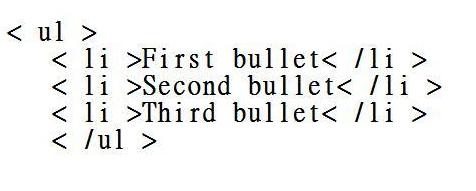
To make a bulleted list: To make a numbered list: To choose the alignment of your writing: < align="the alignment you want (justify,right,left)"> < /p >
If you want a justified alignment, insert the word justify in between the quotation marks ( " " ).
To add an image or picture: The image source can be the file name or the URL where the image is located. The alternative text is the text that will appear in case the photo doesn’t download properly . The width and height are the attributes in pixels which determine the size of the picture.

Other attributes which can be added within the tag are align (the alignment of the pic); border; hspace and vspace (the horizontal and vertical space from of the text from the pic); etc. Wordpress and Blogger both have built-in editors so you can easily fix photo settings but just in case you need to do it manually, it helps to know the tags.

Here is a site I found that provides a more detailed definition of the HTML <> tag. Samples are also available so you can get to try embedding HTML images on your own.
Use HTML Tags to Enhance Your Writing
You can use HTML tags when:
  • submitting articles to article directories (most article directories accept basic HTML tags for easier reading)
  • posting blog entries (make sure that you place the tags in the HTML editor of your composer)
  • leaving comments in blogs or websites (You can make a text clickable if you want to direct the blog/website owner to your site. However, exercise discretion when doing so.)
  • optimizing your website to improve search engine ranking (SEO)
Another significant tag is target=" _blank". This tag is combined with the a href tag if you want the page to open in a different window.
For example: 


how to edit your own writing

simple html tags 
Last but not least, the rel="nofollow" tag is very important if you want to point a reader to another website but don't want to hurt your own website's ranking. Too many outbound links (links pointing to another website) can do that. To understand more how the nofollow tag affects website ranking, you can read this or this.

These are just some of the basic tags I frequently use for blogging? Which ones do you use? Do you know of other simple HTML tags which can help?


What did you think of this article? I'd love to hear your thoughts. If you enjoyed the read or if you find it useful, kindly please click any of the sharing icons below. You can Tweet, Stumble, Share it on Facebook or +1 it.
Thanks , Rachel:)

photo sources: 
1. ; ; 
2. ; ;